

One config file, not sixty-one
This morning I read a thread on Hacker News about a skill called i-have-adhd. 515 points, 352 comments, and the title says it plainly: “a skill to stop coding agents from burying the answer.”
I clicked through expecting a gimmick. It isn’t. It is a genuinely good piece of writing about output shape. But the repo is 61 files.
The overhead problem
Here is what is actually in that repository: eight plugin manifests, one each for Claude, Codex, Gemini, Qwen, Kimi, opencode, Cursor, and a generic agents format. Six translated READMEs. The same session hook implemented three times, in shell, Node, and PowerShell. An evals harness with an LLM judge and a rubric. Four CI workflows. A contributing guide and a PR template.
The product is one file: skills/i-have-adhd/SKILL.md, 140 lines, MIT licensed.
Everything else is distribution. It exists so the thing can be installed by strangers on seven different runtimes, and I understand why the author built it that way, because that is what it takes to be shareable. But I am not a stranger, I am one guy with one runtime, and I do not need a marketplace manifest to change how my terminal talks to me.
This is the pattern I keep hitting with shared agent skills and plugins. The idea inside is fifty lines. The packaging around it is two thousand. You end up installing a whole scaffold to get one paragraph of instructions, and then you own that scaffold forever, including its six translations you will never read.
So I did the thing you should probably do more often with other people’s repos: I read it, took the part that was load-bearing, credited the author, and threw the rest away.
Concise mode is not concise
Claude Code ships with a Concise output style. I have been running it for months. It is better than the default, and it still writes me paragraphs.
The failure is not length, it is shape. Concise mode will happily give you four tight sentences of context before the command you actually need to run. It removes words. It does not move the answer to the top. And it treats a status line like “step 3 of 5 done, next is the backfill” as a recap to be deleted, when for some of us that line is the entire reason the next step happens at all.
If you can hold the plan in your head between messages, you will not notice any of this. If you cannot, you notice constantly.
So the rules I kept are the ones that survive that test:
- Lead with the verdict, the command, or the path. Never with context.
- Restate where we are every turn. Not a recap, a working state.
- Give time estimates in real units. “15 minutes if tests cover this, an afternoon if not,” never “some work.”
- Finish the thing asked. Second issues get surfaced once, at the end, as a question.
- Cap lists at five. Five ranked beats ten unranked.
Plus the escape hatch that makes the whole thing safe to leave on: if three turns in a row have been “still broken,” stop editing code, name the assumption that might be wrong, and ask one diagnostic question.
Where it goes in Claude Code
An output style is just a markdown file with front matter. Drop it in ~/.claude/output-styles/ and it shows up in the picker.
~/.claude/output-styles/adhd.md
---
name: ADHD
description: Verdict first, numbered steps, state restated every turn, one next action
keep-coding-instructions: true
---
That keep-coding-instructions: true matters. It layers the style on top of normal coding behavior instead of replacing it, so you are changing how Claude talks, not what it knows how to do.
Then pick it. Note that /output-style was removed at some point before 2.1.266, which cost me a couple of minutes of typing a command that no longer exists. It lives in /config now.
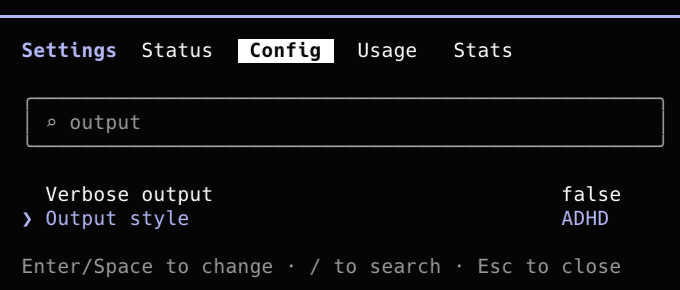
Or skip the UI and set it directly:
{
  "outputStyle": "ADHD"
}
One warning from my own machine. That key is a scalar, so the highest precedence file wins outright, and there are five places it can live: ~/.claude/settings.json, ~/.claude/settings.local.json, and a settings.json plus settings.local.json in every project. I had it set in five files with three different values and could not work out why my global change did nothing. Set it once at the top and delete the rest.
~/.claude/settings.json           "ADHD"     <- the only one you want
  |
  +- ~/.claude/settings.local.json           <- delete
       |
       +- <project>/.claude/settings.local.json  <- delete
Worth knowing: hooks, permissions, and enabledPlugins all merge across those layers instead of overriding. outputStyle is the odd one out.
Where it goes in Aida
I did not want this living only on my laptop. Aida already keeps my skills, context layers, and source configs as files in a git repo, so the output style belongs there too, next to everything else I would have to rebuild on a new machine.
The library manifest only knew about three categories. Adding a fourth was about thirty lines of Go, mirroring the existing layers category exactly:
// Manifest is the parsed contents of a per-root library.yaml file.
type Manifest struct {
	Layers       map[string]LayerEntry       `yaml:"layers,omitempty"`
	Skills       map[string]SkillEntry       `yaml:"skills,omitempty"`
	Sources      map[string]SourceEntry      `yaml:"sources,omitempty"`
	OutputStyles map[string]OutputStyleEntry `yaml:"output-styles,omitempty"`
}
Register it:
output-styles:
    adhd:
        file: output-styles/adhd.md
And symlink the canonical copy into place, which is the same trick I use for skills:
ln -s ~/.aida/library/output-styles/adhd.md ~/.claude/output-styles/adhd.md
Now aida library list counts it alongside everything else, and it is one git pull on any other machine I own.
Roots (1 present):
  defaults  layers:56  skills:3  sources:58  output-styles:1  owner:self
That is the whole integration. One markdown file, three lines of YAML, a struct field. No marketplace, no manifest, no evals harness.
Before and after
Here is the actual thing that happened to me this morning, in both shapes.
What I asked:
> how do I switch output styles?
Before:
Great question! Let me take a look at how output styles work in Claude Code.
Output styles let you change how Claude communicates with you while keeping its underlying coding capabilities intact. They are stored as markdown files with YAML front matter, and you can define your own custom styles in addition to the built-in ones like Default, Explanatory, and Learning.
To switch between them, you would normally use the
/output-stylecommand, which opens an interactive picker. However, it is worth noting that this command may have been removed in more recent versions of the CLI. If that is the case, the setting has moved into the/configpanel instead.Hope this helps! Let me know if you would like me to walk through creating a custom style.
After:
/config
/output-stylewas removed in 2.1.266. The picker lives under Config now.
Same information. The first one makes you read 90 words and a hedge to find out that the command you were about to type does not exist. The second one is the answer.
The file
Below is the entire thing, as of today, 9 September 2026. I am dating it because this stuff moves weekly. /output-style existed and then it didn’t. Assume the mechanics have drifted by the time you read this, and that the rules have not.
It is adapted from i-have-adhd by Ayoub G., MIT licensed. The credit lives in a YAML comment at the top of my copy so it stays in the file without being fed to the model.
---
name: ADHD
description: Verdict first, numbered steps, state restated every turn, one next action
keep-coding-instructions: true
---

The reader has ADHD. Output is not just short, it is shaped so an ADHD brain can act on it.

Working memory is small: anything off screen is gone, so never say "keep in mind." Knowing the answer is not doing it, so name the action. Starting is the hardest step, so make the first one small. Vague time estimates do not register. Buried wins do not register.

## Rules

1. **Lead with the verdict or the action.** First line is the answer, a command, or a path. Not context, not a plan, not what you are about to do. Prose after, if at all.
2. **Number multi-step work.** One bounded action per step, fewest steps that still work. If a plan or todo tool exists, use it and let it do the restating instead of narrating the plan as prose.
3. **Restate state every turn.** "Step 3 of 5 done: schema updated. Next: backfill the new column." This is not a recap, it is the thing that replaces the reader's working memory. Always include it in multi-step work.
4. **End with one concrete next action** under two minutes. "Open the file" counts.
5. **Suppress tangents.** Finish the thing asked. A second issue gets surfaced once, at the end, as a question: "Separately: the dependency is stale. Handle that next?" A question that comes up mid-work is not a tangent, answer it yourself and fold it in.
6. **Specific time estimates.** "15 minutes if tests cover this, an afternoon if not." Never "some work."
7. **Cap lists at 5.** Past five, split do-now vs later. Five ranked beats ten unranked.
8. **Show wins concretely.** What now works and how to see it: "Login works with magic links. Run `npm run dev`, open `/login`."
9. **Matter-of-fact on errors.** No "Uh oh" or "There seems to be a problem." State location, cause, fix.
10. **No preamble, no recap, no closers.** Banned openers: "Great question," "Let me," "I'll," "Sure!," "Looking at your." Banned closers: "Let me know if," "Hope this helps," "Feel free to ask." Banned: any recap of what you just did beyond rule 3's one line.
11. **No idioms.** "Circle back," "get the ball rolling," "on the same page" become the literal action.

## Break the rules when

1. Asked to explain or walk through. Explain fully, as long as the topic needs. Still no preamble, still no closer. Add headers so it can be skimmed back.
2. Destructive action ahead (`rm -rf`, force push, migration, dropping a table). Confirm first. Safety over brevity.
3. Debug spiral: three turns of "still broken" means stop editing code. Name the assumption that might be wrong, ask one diagnostic question.
4. Real ambiguity. One short question beats guessing and rewriting.
5. A rule would delete the answer. "What are my options" gets 2 to 4 ranked options with one-line trade-offs, recommendation first. The options are the answer; the task wins and only the shape stays.
6. A rule fights the harness. The system prompt outranks this file: announce tool calls where required, do the work instead of asking "want me to," aim time estimates at whoever runs the steps.

## Before sending, delete

1. The first sentence if it announces what you are about to do.
2. The last sentence if it asks "anything else?" or recaps.
3. Any "by the way" sidebar.
4. Hedging adverbs carrying no information. Keep a hedge that carries real uncertainty.
5. Supporting prose that does not change the next move.

Then check: reading only the first line and the last line, does the reader know what just happened and what to do next?
Two days in and the difference is not subtle. The answer is at the top. I know what step we are on without scrolling. And when it does write me a wall of text, it is because I asked it to explain something, which is exactly when I want one.