"Sometimes you gotta run before you can walk" - Tony Stark
Simple Apps
A collection of simple, focused macOS utilities.
Built with native Swift and SwiftUI. Each app is 1–2 MB — the Electron equivalent would be 80–120 MB. Your disk space is safe here.
Viewer Toolbox
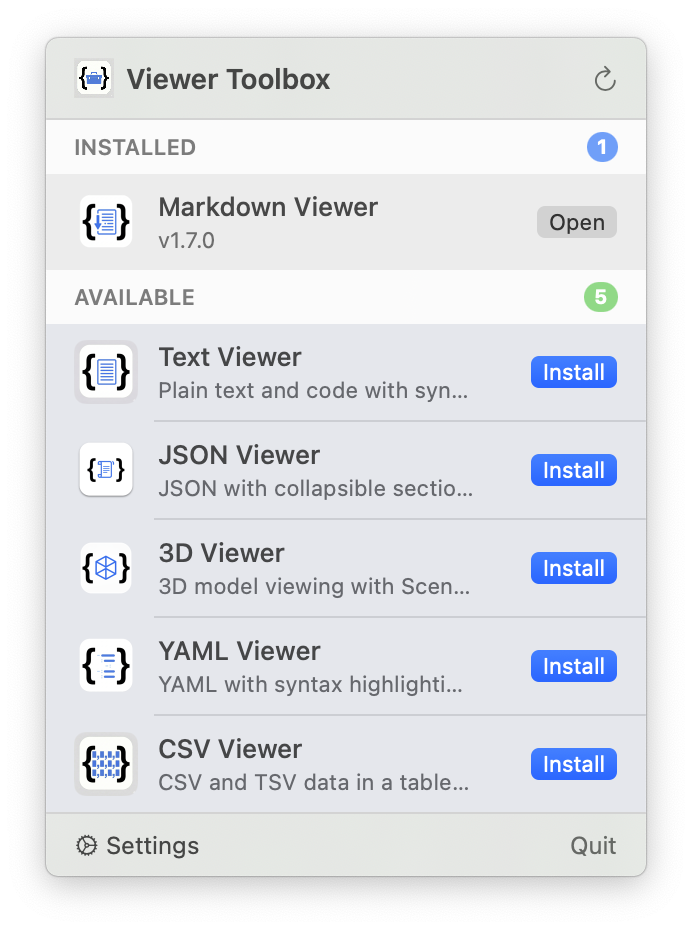
A macOS menu bar app that manages all viewer apps, shared settings, and keeps everything up to date.
Buy on Gumroad — $20 v1.8.0
Features
- Quick access to all viewer apps from the menu bar
- Install, update, and launch viewers in one place
- Shared settings: font, theme, and editor preferences sync across all viewers
- Automatic updates via Sparkle
TextViewer
A simple, native macOS app for viewing plain text and code files with syntax highlighting.
Download TextViewer.dmg v1.3.0
Requirements
- macOS 13.0 or later
- Universal binary (Intel + Apple Silicon)
Features
- Syntax highlighting for many languages
- Line numbers and word wrap
- Configurable font and theme
- Light/dark mode support
Installation
- Download and open the DMG
- Drag TextViewer to your Applications folder
JSONViewer
A simple, native macOS app for viewing JSON files — like Preview for images, but for .json files.
Download JSONViewer.dmg v1.7.0
Requirements
- macOS 13.0 or later
- Universal binary (Intel + Apple Silicon)
Features
- Syntax highlighting: color-coded keys, strings, numbers, booleans, and null values
- Expand/collapse objects and arrays with click
- Error detection with line highlighting for invalid JSON
- One-click copy to clipboard
- Light/dark mode support
Installation
- Download and open the DMG
- Drag JSONViewer to your Applications folder
MarkdownViewer
A simple, native macOS app for viewing Markdown files — like Preview for images, but for .md files.
Download MarkdownViewer.dmg v1.10.0
Requirements
- macOS 13.0 or later
- Universal binary (Intel + Apple Silicon)
Features
- Full Markdown support: headers, bold, italic, links, code blocks, lists, tables, images, strikethrough, task lists
- Syntax highlighting for fenced code blocks
- Export as PDF
- Dark mode support
- Open files via File menu, double-click, or drag & drop
- Copy raw Markdown or formatted rich text
Installation
- Download and open the DMG
- Drag MarkdownViewer to your Applications folder
3DViewer
A simple, native macOS app for viewing 3D model files — like Preview for images, but for 3D models.
Download ThreeDViewer.dmg v1.6.0
Requirements
- macOS 13.0 or later
- Universal binary (Intel + Apple Silicon)
Features
- Multiple format support: STL, OBJ, USDZ, PLY, and DAE files
- Interactive controls: orbit, pan, and zoom
- Wireframe mode toggle for inspecting model structure
- Auto-centering and scaling for optimal viewing
- Grid floor for spatial reference
- Light/dark mode support
Installation
- Download and open the DMG
- Drag ThreeDViewer to your Applications folder
YAMLViewer
A simple, native macOS app for viewing YAML files with syntax highlighting and validation.
Download YAMLViewer.dmg v1.4.0
Requirements
- macOS 13.0 or later
- Universal binary (Intel + Apple Silicon)
Features
- Syntax highlighting for YAML
- Validation with error reporting
- Configurable font and theme
- Light/dark mode support
Installation
- Download and open the DMG
- Drag YAMLViewer to your Applications folder
CSVViewer
A simple, native macOS app for viewing CSV and TSV files in a clean table format.
Download CSVViewer.dmg v1.2.0
Requirements
- macOS 13.0 or later
- Universal binary (Intel + Apple Silicon)
Features
- Table view for CSV and TSV data
- Column sorting and resizing
- Configurable font and theme
- Light/dark mode support
Installation
- Download and open the DMG
- Drag CSVViewer to your Applications folder